logo
  • Find resources
        • Teaching Guides
          • Accessibility
          • Assessment
          • Course design
          • Engagement
          • Inclusion
          • Multimedia
          • Teach with Canvas
          • All teaching guides
        • Technology
          • Canvas
          • Google Workspace
          • MediaSpace
          • PebblePad
          • Zoom
          • All platforms
        • Get Help
          • Instructor support
          • Teaching at PSU
  • Portland State University
Back to MediaSpace tutorials
👋 Contact Support

Log in to PSU MediaSpace

Learn how to log in to MediaSpace, PSU’s streaming media server.

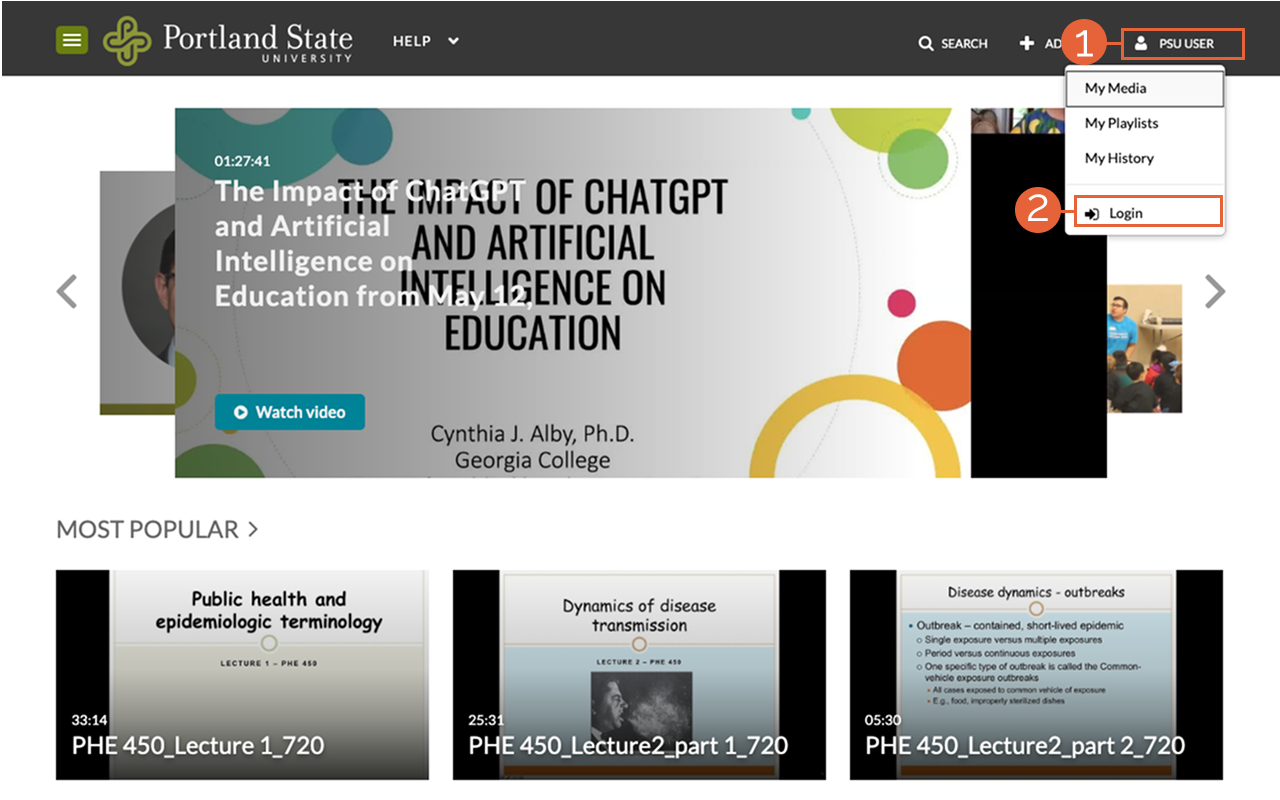
  1. Browse to media.pdx.edu
PSU User and Login buttons
  1. Select PSU User.
  2. Select Login.
  3. On the PSU Single Sign-On page, enter your Odin username and password, then confirm with Duo.

This article was last updated Jun 25, 2026 @ 2:40 pm.

You might also like

Kaltura MediaSpace logo

Permissions overview and sharing media

Kaltura MediaSpace logo

Kaltura MediaSpace Player Upgrade

👋Need more help?

Submit a support request through our Faculty Support portal for assistance.

Contact support

Portland State UniversityThe Office of Academic Innovation

OAI+ is the self-service resource website of Portland State University’s faculty support unit, the Office of Academic Innovation (OAI).

Get in touch

Request Support
Collaborating with OAI+

Newsletter

Sign up for the Teaching @ PSU newsletter and stay informed on pedagogical insights and faculty development opportunities.

Socialise

Creative Commons by attribution, non-commercial

Except where otherwise noted, this work is licensed under a Creative Commons Attribution-NonCommercial 4.0 International License.

Privacy Preference Center

Privacy Preferences